
SEO and the perils of keyword stuffing: 5 ways to get it right
SEO (Search Engine Optimisation) used to mean keyword stuffing: think of trying to cram as much as possible into a suitcase, then jumping on it, sitting on it, and forcing it closed with all your might.
Back then, it was all about volume; i.e. fitting in as much stuff as possible. Nowadays however, it’s to do with quality; i.e. thinking about what might actuall be useful to the reader.

Here are 5 tips to improve your website’s SEO:
-
The ‘Goldilocks’ principle
This is what I call the principle of ‘not-keyword-stuffing’ (so you won’t find it referred to this if you Google* the term) – in other words, “Not too much…not too little….just the right amount”.
What is the exactly right amount? Well, it’s more of an art than a science (unless you have full access to all of Google’s* algorithms) but if you follow the common-sense basics you’ll be OK.
(*) Other search engines are available….but let’s face it, you need to get it right for Google!
For the specified keyword per page:
- Images – reference the keyword in the ALT tag
- Title – include in the 1H title (and preferably 2H as well)
- URL – include the keyword in the page-specific URL (by default, if it’s in the 1H title, it should appear in the URL as well)
- Don’t overstuff – Google is sensitive to this; it’s what bots are prone to do…and you don’t want your website to be referenced as a bot.
- SEO tools such as Yoast are available to check you haven’t overstuffed and have addressed the SEO basics described above
- Related articles: http://www.nobleword.co.uk/social-media-scoring-blogs-yoast/
2. One search phrase per page
A well-structured website makes it easy for Google to find what you’re talking about.
Think of it like a exam….except that with a website, you are not just answering the question, but asking it as well. Examiners hate ‘fluff’ and ‘not answering the question’, so be clear and concise in your structure.
For example if a page in your website is about ‘Brazil’, this should be the keyword that is optimised (see 1. ‘Goldilocks principle’ above), so don’t include useful information on Argentina, Uruguay…etc on the same page if that’s what you also want to promote.
3. Internal links
Again, let’s go back to the previous ‘Examiner analogy’ – think back to English Literature exams: internal links are the equivalent of providing relevant supporting quotes to illustrate/back up your answer. The operative word here is relevance.
So, for example, let’s say that your website is about ‘Blue Bananas’ – that’s what you sell, it’s what you’re about, it’s what you want to promote.
Hence, if anybody searches for ‘Blue Bananas’, you want to appear on the 1st page of Google, ideally at the very top.
The big advantage of internal links is that it makes your website ‘relevant’, so if anybody Googles ‘Blue Bananas’, not only will it bring up your website, but also, all the other relevant pages in your website.
I’ve used my own website Nobleword (note the internal link to my HOME page) as an example (no offence to Blue Bananas!), and hey presto…this is what appears on Google:
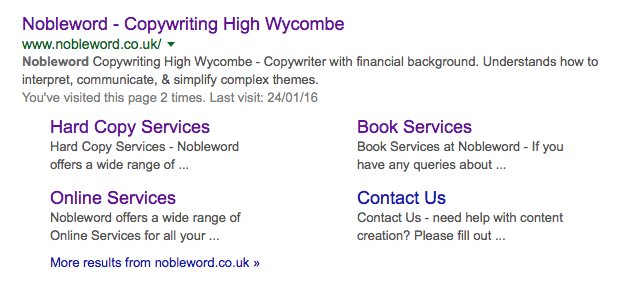
Website designers call this ‘Index Structuring‘
4. External links
I’m going to keep returning to this ‘Examiner analogy’ – external links are the equivalent of ‘showing your workings’; remember, you were always told to do this because examiners couldn’t give marks for a blank piece of paper or the wrong answer…but if you showed them your sources or how you arrived at the ‘wrong’ answer, then they could give you some credit.
The most common way to reference external websites is via blogs.
If you don’t already write blogs and if your website doesn’t rank on the 1st page for Google searches….you should seriously think about doing so – it’s probably the quickest way to improve your SEO and search ranking
Related article: http://www.nobleword.co.uk/blogging-5-tips-for-blog-writing/
5. Professional website structure
You might have built your own website, and it might work OK to the outside eye, but behind the scenes, check that it has the basics in place for search engines, such as:
- Site map
- Indexed pages
- Analytics tools
This isn’t an exhaustive list as I’m not a website designer, so I sub-contract and manage external web designers depending upon the type of website. For example, for any WordPress websites, I work closely with WHD Solutions (see there’s than external link).
Obviously, this depends upon the nature of your business.
Conclusion
So, it’s not rocket science after all – it’s just about having an ordered approach to structuring your website and any future updates.
By way of recap then, this blog has included:
- External links – Yoast (an SEO optimisation tool), WHD
- Internal links – to Nobleword HOME page and previous blog postings
- Pictures – with ALT tags (which you can’t see…but they are there, in the background…honestly!)
Hopefully, it hasn’t over-stuffed the ‘SEO’ keyword (which appears both in the H1 title/URL and in the H2 summary), but if it has, please do let me know….that is, if you’ve managed to read this far down!



Another excellent blog Matt, in fact I have learnt more about SEO reading your article than working with an SEO ‘expert’ a few months ago!