
Book Tips: #1 Define your Style Gallery

A Word style is a set of formatting instructions. Word comes with lots of them pre-saved, or you can create your own.
So, for a book I’m currently working on, I created the following Style Gallery:
- Chapter number
- Chapter Title
- Headline Quote
- Quote attribution
- Normal
- Major Heading
- Minor Heading
- Emphasis
The reasons for this are two-fold:
- If you want to change the look of your document at a later stage, you only have to change the ‘Style’ at source, and it will change every instance of this ‘style’ in your document (as you will have coded it already – see below)
- It creates a consistent format for online publishing – believe me, otherwise your carefully-prepared manuscript will probably be all over the place once uploaded onto the Amazon preview pane. Very disappointing indeed!
How to set up your ‘Quick Styles’ Gallery
- Work only with the styles you will use – right click on a Style to ‘Remove from Quick Style Gallery’ [note: this will only remove it from the HOME page Gallery on your Word document – it won’t delete it entirely]
- Save your defined styles in a template – so you can reuse them at later date.
If you go to the HOME page on Word, you should see some boxes next to the button labelled ‘Styles Pane’, starting with a box labelled ‘Normal’.
If you right click on this box, you should see something like the following screen:
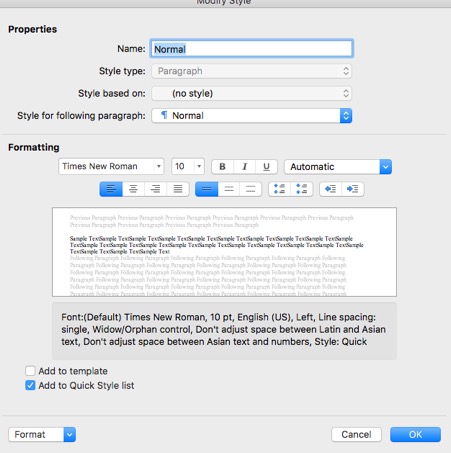
You can customise the attributes – font, size, alignment…etc – as you wish
So, highlight all the text you want to be ‘Normal’ in your document, then click on the ‘Normal’ button in the Style Gallery.
And do likewise for ‘Chapter Headings’…etc (or whatever you wish to call your Styles as you go along.)
So, in conclusion, not only is using ‘Styles’ good working practise, it makes re-formatting a piece of cake and will save you hours if you are thinking of trying to publish your book online.




Great encouragement Matt! What’s more, styles created in Word also map through to professional layout tools like InDesign and Quark Xpress, saving designers a lot of time and clients a lot of money! If everyone used styles properly in Word, more people in the publishing and design industry might actually get to go home on time!
Ha! I can tell that I’ve touched up a nerve here…..!!!